
Growth & badges
Understand your consistency, effort, progress, member level, and current training badges.
Growth turns eligible club training into a view of your recent habits and progress. Open Today → Growth in Member App, or Growth in the Dashboard Member workspace. Use the same membership when comparing the two.
Read the three scores
| Signal | What it describes | How to read it |
|---|---|---|
| Consistency | Training frequency and recent attendance rhythm. | Look at regularity across the evaluation period. |
| Effort | Recorded heart-rate zones and workout intensity. | Compare scored workouts with sufficient heart-rate data. |
| Progress | Change in training performance after enough valid history is collected. | Review the trend and available component scores rather than one workout alone. |
Collecting, unavailable, and a dash do not mean zero. A result must be eligible and processed before it can contribute. Personal workouts remain in your history but do not contribute to level, growth, badges, challenges, or reward points.
Follow your member level
Your current level appears with the combined score. The levels are Starter, Builder, Momentum, Consistent, Performer, and Elite. Open the level history to distinguish an upgrade, a maintained level, a downgrade, and grace protection.
A level is evaluated over time; finishing one workout does not guarantee an immediate change. Compare the evaluation date and the visible history window when checking Member App against Dashboard. The two views can show different amounts of history.
Understand current badges
Open a badge or Explore all badges to read the rule. Badges reflect recent training, update when that training changes, and do not add points to your level score.
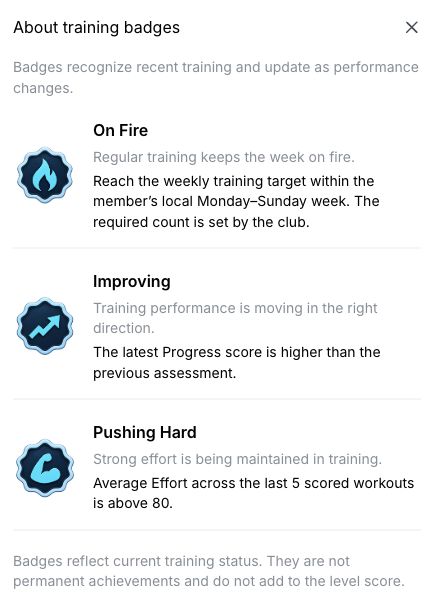
On Fire follows your club's weekly training target in your local Monday–Sunday week. Improving compares the latest Progress assessment with the previous one. Pushing Hard uses recent scored workout effort. Check the displayed rule and current status instead of assuming a badge lasts forever.
Follow the complete update flow
- Confirm your profile and training details, including the units and maximum heart rate used by your account.
- Join and complete an eligible club workout using the correct member and device.
- Allow Station and any participating recording device to upload their results.
- Open workout results, then revisit Growth after processing and evaluation.
- Use the trend charts and level journey to see what changed.
If a score stays unavailable, inspect the contributing workouts for missing heart-rate data or a not-counted explanation. Contact your club with the workout dates and the status shown. Do not change your profile just to force a higher score.