
Loaner straps
Register, assign, use, and return a club heart-rate strap across Dashboard, Station, and Member App.
A loaner strap is a club-owned heart-rate device temporarily assigned to a member at a Location. Assigning it correctly lets the member train without changing their personal device registration.
Register a strap in Dashboard
Authorized club staff open Loaners, choose the Location, and select Register strap. Enter a useful device name and the strap's actual ANT ID, then create the record. Read the identifier from the device rather than guessing from its display name.
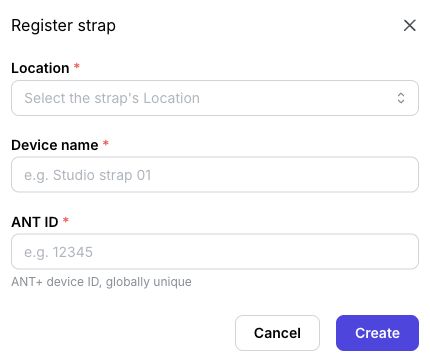
The identifier must be unique. If the strap already exists, find its current record or contact the responsible club staff instead of registering a second copy.
Assign and train
- In Dashboard or Station's Loaners view, find an available strap for the Location.
- Choose the assignment action and select the correct member in that Location. Verify the saved assignee before handing over the strap.
- Have the member wear and wake the strap. In Member App, a current loaner is shown above personal devices and takes priority for that Location.
- Check the member's live signal on Station, then complete the training session.
- After upload, the member reviews the session in Workout results.
If another staff member has assigned the strap meanwhile, refresh the list and resolve the current assignment. Do not continue using a strap shown against someone else.
Return the strap
Collect the physical strap and use Return in Dashboard or Station. Check that it is available before assigning it to the next member. Returning a physical device does not by itself clear the recorded assignment.
When the club uses Return loaners after session, automatic return applies to loaners used in that session after results finish uploading. It is not a substitute for checking the strap back in physically or verifying a delayed upload.
Returning a loaner does not alter the member's saved personal device ID. Before the next workout, confirm that the member is using the intended personal device again. Return an assigned strap before editing or deleting its record; review its history when investigating an incorrect assignment.
If the signal belongs to the wrong person
Stop and check the physical ANT ID, Location, and current assignment. Correct the assignment through the loaner controls and confirm the next live reading. If a completed workout is affected, give your club the session time and strap identifier for review rather than recreating the workout.